Project Overview
The vision for Aurora is to create a powerful, no-code visual editor for building websites directly in the browser. It follows a block-based architecture where users construct pages by combining, nesting, and styling a library of pre-defined components. The editor aims to provide an intuitive user experience with features like drag-and-drop, a context-aware inspector panel, and a live global theming system, empowering users to create custom designs without writing a single line of code.
Gallery
Tech Stack
- Next.js 15
- React
- TypeScript
- Tailwind CSS v4
- Turborepo
- pnpm Workspaces
- Next.js API Routes
Key Features
- Monorepo Foundation: The entire project is structured as a scalable monorepo, with a clear separation between the main web app and shared UI/block libraries.
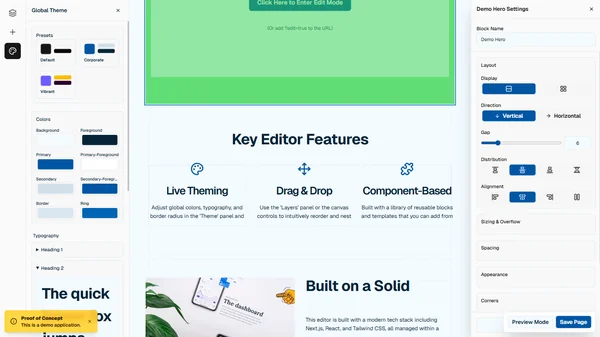
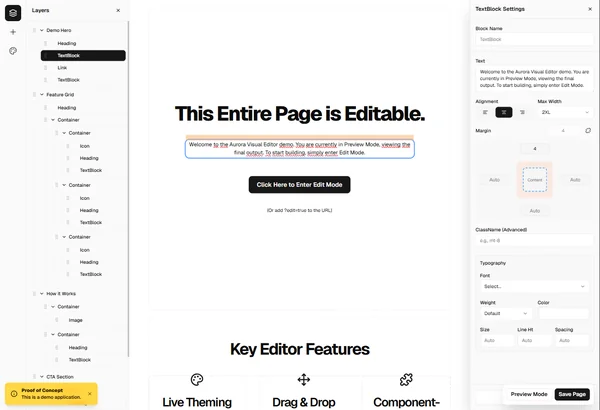
- Core Editor UI: A classic three-panel editor layout is implemented, featuring a left sidebar (for layers, adding blocks, and theming), a central canvas, and a right-side inspector panel.
- Block System: The system can render a full webpage from a JSON structure. It includes a library of primitive blocks (Container, Heading, Button, etc.) and pre-composed templates (Hero Section, CTA).
- Drag & Drop: Full drag-and-drop functionality is implemented for reordering and nesting blocks, both within the "Layers" panel and directly on the visual canvas.
- Dynamic Inspector Panel: A context-aware inspector sidebar is functional. When a block is selected, its specific settings (e.g., text alignment, colors, spacing) are dynamically displayed and are fully editable.
- Live Theming: A global theme editor is implemented. Users can adjust CSS variables for colors, typography, and border radius across the entire page in real-time and switch between pre-defined theme presets.
- Content Editing: Inline, live editing for text-based blocks like `Heading` and `TextBlock` is fully functional.
- Persistence API: A simulated backend API is in place to save both the page structure (JSON) and the global theme data.